The best Pomodoro apps for work, and the one feature that matters
Every Pomodoro app counts down from 25. The good ones help with what happens at minute 12.
20 October 2026 · 5 min read
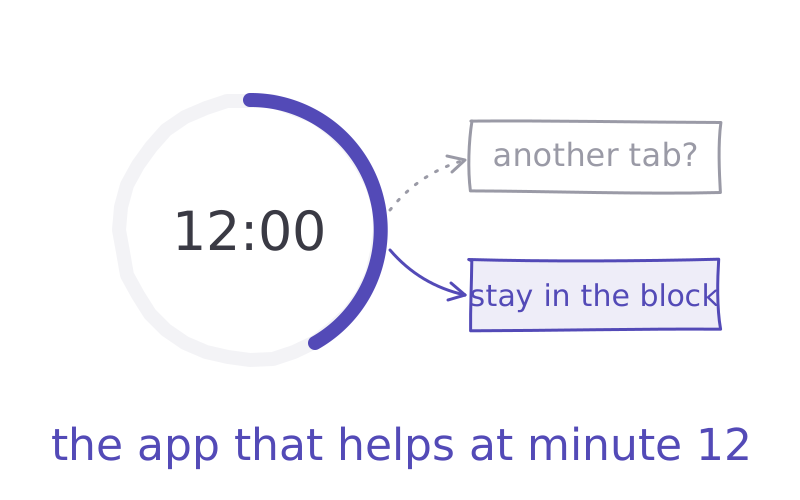
Minute 12 of your Pomodoro. The task just got hard. Your hand is already on the trackpad, heading for another tab.
Quick answer: for most people at work, the best Pomodoro app is the one that helps at minute 12. A free browser timer is enough to start. Pick a paid one only if you need it to block sites or track tasks.
What a Pomodoro app should actually do
The Pomodoro technique is simple: work for 25 minutes, rest for 5, repeat. Any clock can do that.
What makes it work is the fixed break. In a 2023 study of 87 university students, those who took breaks on a set schedule felt less tired and less distracted than students who chose their own breaks, and got the same work done in less time.
So a good app does three things. It makes starting easy. It keeps the break short and real. And it helps when you want to quit mid-block, by blocking a site, or by giving the urge somewhere better to go. That last one is where most apps differ.
Free, in your browser
CatchScroll focus timer. Free, no sign-up, runs in any browser on Mac, Windows or a Chromebook. Pomodoro blocks with brown noise, rain and other calm sounds, and the countdown shows in your browser tab while you work. Best for: starting today with nothing to install. It's ours, so judge it yourself: try the free timer.
Pomofocus. A customisable Pomodoro timer for desktop and mobile browsers, with desktop apps for Mac, Windows and Linux. It has a set of basic features, and a premium tier that removes ads and adds a Todoist connection. Best for: a simple timer with a task list beside it.
On a Mac, with blocking built in
Flow. A Pomodoro timer for Mac, iPhone, iPad and Apple Watch. The basic features are free, with no sign-up. It can block chosen apps and websites while you focus. Best for: Mac users who keep drifting to the same sites.
Session. A focus timer for Mac, iPhone and iPad that syncs your sessions between them and shows where your time went. On the Mac it blocks the apps and websites you pick while a session runs. Best for: people who like to see their focus history.
With a to-do list, or a tree
Focus To-Do. A Pomodoro timer joined to a task manager: reminders, due dates, subtasks and reports of where your time went. Runs on Android, iPhone, iPad, Apple Watch, Mac, Windows and as a Chrome extension. Best for: people whose day is lots of small tasks.
Forest. A tree grows while you focus, and dies if you leave to use another app. It runs on iPhone, iPad and Android, with extensions for Chrome and Firefox. There's a free version and an optional paid Plus. Best for: when your phone is what breaks the block.
How to choose in two minutes
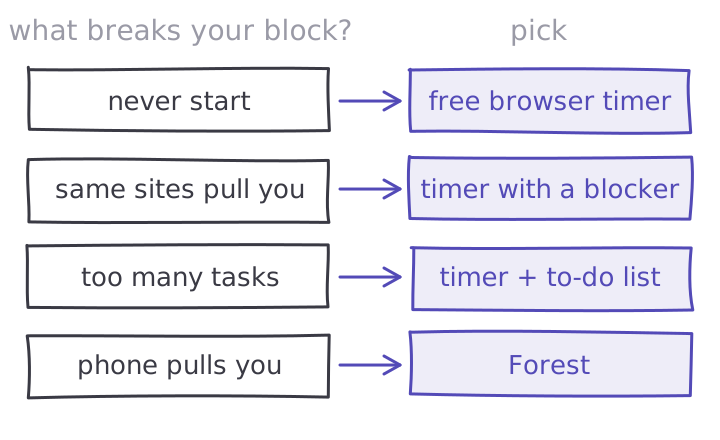
Think about your last three blocks. What broke them?
If nothing did and you just never started, use a free browser timer today. If the same two sites pulled you away, pick a timer with a blocker. If you lost track of what to work on, pick one with a to-do list. If it was your phone, try Forest, or put the phone in another room.
And if the urge came from inside, a hard task you wanted to escape, no timer can block that. That's what CatchScroll's two-minute resets are for: you name the feeling, take the reset, and go back to your block.
Then run four blocks tomorrow morning and count how many you finished. More tips in the Pomodoro technique for studying, and in time blocking if you'd rather plan the whole day. For a wider list of tools, see the best focus apps.
So, what broke your last block?
Try it
Start with the free CatchScroll focus timer: no sign-up, calm sounds, the countdown in your tab. When the urge to quit hits at minute 12, the two-minute resets are there for that, free for your first 7 days.
Start the free focus timer →
Sources
- 01Biwer, F. et al. — Understanding effort regulation: comparing Pomodoro breaks and self-regulated breaks. 87 university students. British Journal of Educational Psychology, 2023 ↗
- 02Pomofocus — customisable Pomodoro timer for desktop and mobile browsers, with Mac, Windows and Linux apps; premium removes ads and adds Todoist. pomofocus.io ↗
- 03Flow — Pomodoro timer for iPhone, Mac, iPad and Apple Watch; basic features free; app and web blocker. flow.app ↗
- 04Session — focus timer for macOS, iOS and iPadOS with sync; blocks chosen apps and websites during focus on Mac. stayinsession.com ↗
- 05Focus To-Do — Pomodoro timer and task manager for Android, iPhone, iPad, Apple Watch, Mac, Windows and Chrome. focustodo.cn ↗
- 06Forest — focus timer where a tree grows while you focus; iPhone, iPad, Android, and Chrome and Firefox extensions; free tier, optional Plus. forestapp.cc ↗